Master background PNG files for web and print. Learn about transparency, optimization, implementation, and best practices for professional results.

Background PNG files have become essential assets in modern web design and digital publishing workflows. These versatile image files support transparency and lossless compression, making them ideal for layered compositions, UI elements, and professional graphics that require pristine quality. Understanding how to properly create, optimize, and implement background PNG files can significantly improve your visual content delivery while maintaining the professional standards your audience expects.
The Portable Network Graphics (PNG) format was designed specifically to address the limitations of earlier web image formats. According to the W3C PNG specification, PNG files support full alpha channel transparency, allowing designers to create images with smooth edges and varying levels of opacity that blend seamlessly over any background.
Background PNG files leverage alpha channel data to control pixel-level transparency. Each pixel contains color information plus an opacity value ranging from completely transparent to fully opaque. This capability makes background PNG files particularly valuable for logos, product photography, and interface elements that need to work across multiple contexts.
The technical architecture differs fundamentally from indexed transparency used in older formats:

PNG files support multiple color types, each affecting how background PNG files render and compress. Grayscale, RGB, and indexed color modes can all include transparency, but the implementation varies. When working with background images, RGB with alpha (known as RGBA or TrueColor with alpha) provides the most flexibility for complex compositions.
The data representation standards define how color and transparency information combine during rendering. This technical foundation ensures that your background PNG files display consistently whether viewed in a browser, design application, or print production environment.
Producing high-quality background PNG files requires attention to both artistic and technical considerations. The creation process impacts file size, rendering performance, and visual fidelity across different display contexts.
When designing background PNG files, edge quality determines professional appearance. Anti-aliasing creates smooth transitions between opaque and transparent areas, but can introduce color fringing when composited over unexpected backgrounds. Professional workflows address this through:
Platforms like removit automate many of these technical steps, ensuring background PNG files maintain professional edge quality without manual intervention.
The export phase critically affects background PNG files performance. Bit depth selection, compression level, and metadata inclusion all influence file size without necessarily improving visual quality. Professional optimization balances these factors:
| Setting | Recommendation | Impact |
|---|---|---|
| Bit depth | 8-bit for photos, 24-bit for graphics | File size and color accuracy |
| Compression | Maximum (level 9) | Smaller files, same quality |
| Interlacing | Disabled for small files | Progressive loading vs. size |
| Metadata | Strip unnecessary data | Reduced file size |
Background PNG files intended for web use benefit from aggressive optimization. Tools can reduce file sizes by 40-70% without visible quality loss through palette optimization, chunk removal, and compression refinement.
Web developers employ various techniques to incorporate background PNG files into responsive designs. The implementation method affects loading performance, accessibility, and visual presentation across devices.
The most common implementation uses CSS background properties. The `background-image` property accepts PNG files and provides extensive control over positioning, repetition, and sizing. This approach works particularly well for decorative elements and UI patterns.
Modern CSS offers sophisticated background handling:
- Multiple background layers with independent positioning
- Responsive sizing using background-size keywords
- Gradient combinations for fallback effects
- Blend modes for creative compositions
According to MDN's backgrounds and borders guide, proper implementation requires understanding the cascade and specificity rules that govern how background PNG files interact with other styles.
While background PNG files excel at transparency and quality, they aren't always the optimal format choice. Modern image format guidance suggests evaluating WebP and AVIF alternatives for photographic backgrounds, reserving PNG for graphics requiring transparency or lossless preservation.
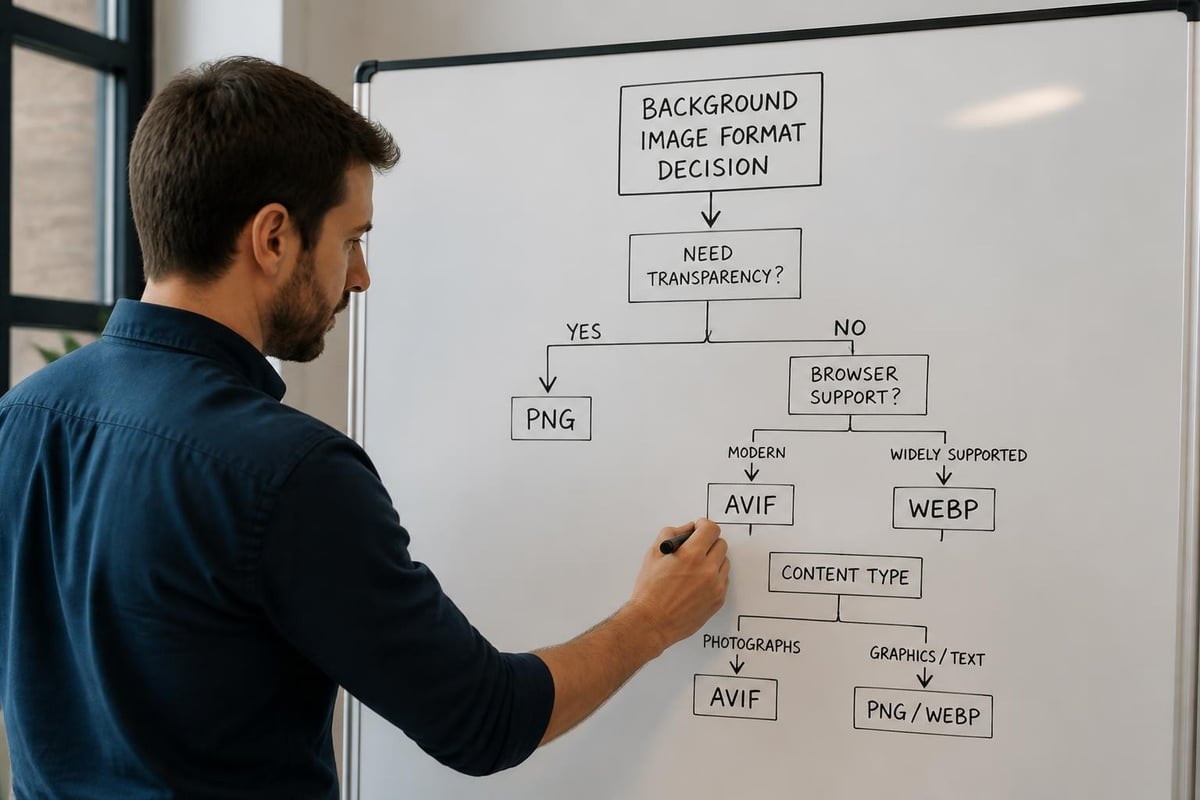
Performance-conscious implementations use:
The web.dev PNG guidance emphasizes that PNG remains valuable for UI elements, icons, and graphics with sharp edges or text, while photographic backgrounds often benefit from modern alternatives.
Background PNG files present unique accessibility challenges that developers must address to ensure inclusive experiences. The distinction between decorative and meaningful content determines appropriate implementation.
CSS background images, including background PNG files, are intentionally hidden from assistive technologies. As explained in WebAIM's CSS techniques, this behavior makes background properties appropriate only for purely decorative visuals that don't convey essential information.
Content that provides meaning or context should never be implemented as CSS backgrounds. Instead, use semantic HTML with proper alternative text. This distinction affects how you structure designs using background PNG files.
Text overlaying background PNG files must meet WCAG contrast requirements regardless of the background's transparency or color variation. Contrast and color accessibility guidelines specify that designers must account for the combined effect of foreground text and background imagery.
Testing requirements include:
Professional workflows incorporate contrast testing tools that evaluate text legibility across the full range of background PNG files variations used in a design system.
Large-scale projects requiring consistent background PNG files production benefit significantly from automation. Modern platforms streamline repetitive tasks while ensuring quality standards across thousands of assets.
Organizations producing e-commerce catalogs, marketing materials, or digital asset libraries need efficient background PNG files workflows. Manual processing becomes impractical at scale, creating bottlenecks and inconsistencies.
Automated systems address these challenges through:
The removit upload endpoint demonstrates how API-driven workflows integrate background removal and optimization directly into content management systems and digital asset platforms.
Background PNG files often need to work across web, print, email, and social media contexts. Each channel has different requirements for resolution, color space, and file format. Professional workflows maintain source files at maximum quality and generate channel-specific variants automatically.
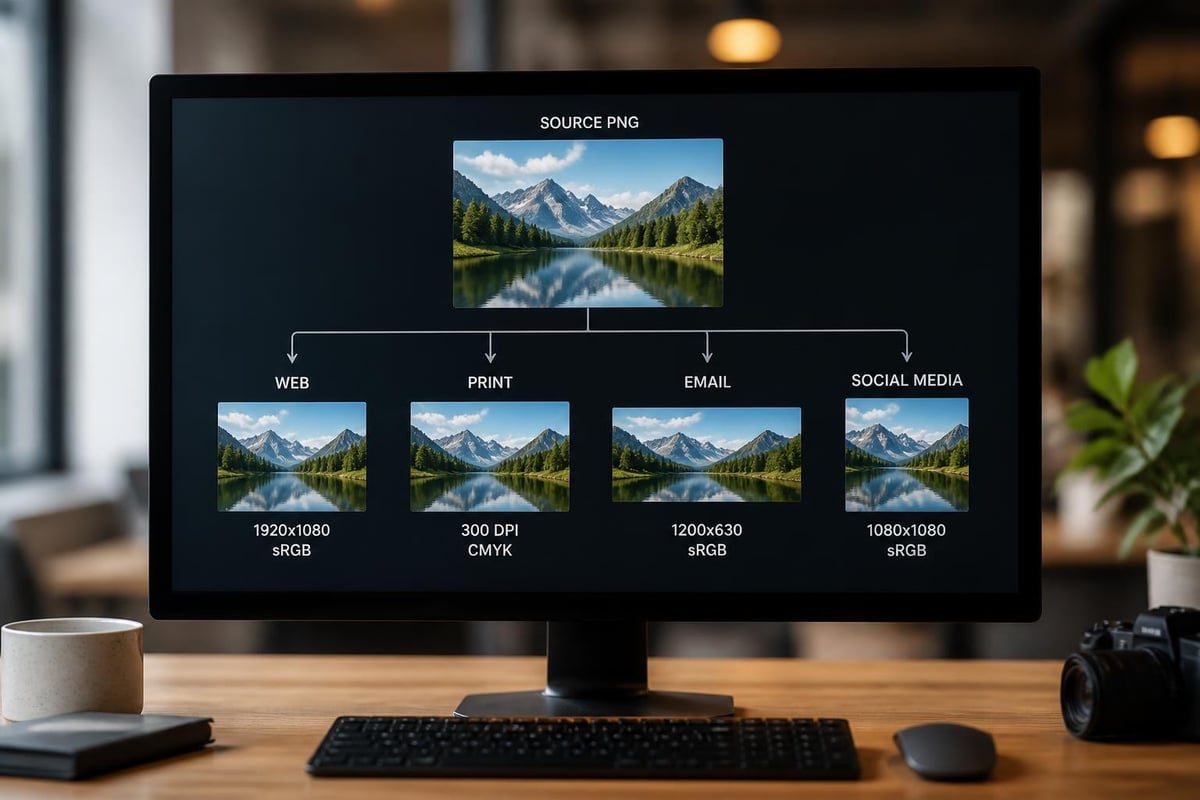
| Channel | Resolution | Color Space | Format Considerations |
|---|---|---|---|
| Web | 72-150 DPI | sRGB | Compressed PNG or WebP |
| 300+ DPI | CMYK/Adobe RGB | Uncompressed or TIFF | |
| 72 DPI | sRGB | Highly compressed PNG | |
| Social Media | Platform-specific | sRGB | Platform-optimized sizes |
This multi-channel approach ensures background PNG files maintain visual consistency while meeting the technical requirements of each distribution context. Integration with removit's workflow automation enables teams to define these variants once and generate them automatically for every asset.
Proper server configuration ensures background PNG files deliver reliably across all client environments. MIME types, caching headers, and compression settings all affect how browsers handle PNG assets.
Background PNG files must be served with the correct image/png MIME type as registered in the IANA Media Types registry. Incorrect Content-Type headers can cause browsers to mishandle files or reject them entirely.
Server configuration best practices include:
.png extensionsModern CDNs and hosting platforms typically configure these settings correctly by default, but custom server environments require explicit configuration to ensure background PNG files serve optimally.
While PNG files include internal compression, HTTP-level compression can provide additional size reduction. Background PNG files typically compress well with gzip or Brotli transfer encoding, achieving 10-30% additional size reduction for network transmission.
The delivery optimization stack for background PNG files includes:
These infrastructure considerations become particularly important for sites using many background PNG files across their interface design.
Professional background PNG files workflows incorporate testing at multiple stages to catch issues before assets reach production environments. Automated and manual testing approaches each serve specific quality assurance needs.
Automated tools can detect technical problems in background PNG files, but visual quality assessment often requires human judgment. Professional workflows establish review processes that balance thoroughness with efficiency.
Testing checklist for background PNG files:
Teams processing high volumes of background PNG files use sampling strategies, reviewing representative subsets while automated systems flag statistical outliers for detailed inspection. The removit FAQ addresses common quality concerns and how AI-powered processing maintains consistent standards.
Background PNG files should meet both quality and performance standards. Establishing size budgets for different asset categories helps maintain fast-loading experiences while preserving necessary visual fidelity.
Performance monitoring tracks:
Analytics revealing that background PNG files consistently exceed size budgets may indicate opportunities to switch specific asset categories to more efficient formats or apply more aggressive optimization.
Beyond standard background removal and transparency, background PNG files enable sophisticated creative techniques when combined with modern web technologies and design approaches.
Designers increasingly use background PNG files as components in layered composition systems. Multiple transparent PNG layers stack to create complex visuals that adapt to context while maintaining crisp quality. This approach works particularly well for:
CSS positioning and z-index control enable precise layer stacking, while background PNG files transparency ensures elements composite cleanly without rectangular boundaries disrupting the design.
Background PNG files combine effectively with CSS transitions, animations, and JavaScript interactions. Transparency enables creative effects like parallax scrolling, fade transitions, and hover states that wouldn't work with opaque image formats.
Modern animation capabilities include:
| Technique | Application | Performance Consideration |
|---|---|---|
| CSS transitions | Smooth opacity changes | GPU-accelerated, minimal impact |
| Transform animations | Position and scale effects | Hardware-accelerated when possible |
| JavaScript sprites | Frame-based animation | File size increases with frames |
| Canvas manipulation | Dynamic image processing | CPU-intensive, use sparingly |
Projects using animated background PNG files should profile performance across target devices, as mobile processors may struggle with complex animations involving large transparent images.
Managing libraries containing thousands of background PNG files requires systematic organization and metadata strategies. Professional digital asset management practices ensure teams can locate, reuse, and maintain assets efficiently.
Consistent naming enables automation while human-readable patterns help designers and developers locate assets quickly. Effective naming conventions for background PNG files balance descriptiveness with brevity.
Recommended naming patterns incorporate:
Directory structures should reflect how teams actually work, grouping background PNG files by project, campaign, product line, or visual style rather than purely by technical attributes.
Modern digital asset management systems enable rich metadata tagging that makes background PNG files discoverable through multiple pathways. Technical metadata (dimensions, file size, color profile) combines with descriptive metadata (subject, style, usage rights) to support sophisticated search.
Metadata strategies for background PNG files:
Well-implemented metadata dramatically reduces time spent searching for assets and prevents duplicate creation of background PNG files that already exist in the library.
Mastering background PNG files requires balancing technical precision with creative vision, ensuring your transparent assets deliver professional results across all channels while maintaining optimal performance. Whether you're processing individual images or managing enterprise-scale workflows, the combination of proper technique and smart automation transforms background PNG files from a production challenge into a strategic asset. removit streamlines this entire process with AI-powered background removal, intelligent optimization, and automated workflow integration that ensures every background PNG file meets professional standards while reducing processing time and costs.
