Discover how background removing AI revolutionizes image editing for businesses. Learn key features, workflows, and best practices for 2026.

The digital transformation of image editing has reached a pivotal moment in 2026, with background removing ai fundamentally changing how businesses handle visual content. What once required hours of manual work in photo editing software now takes seconds through sophisticated artificial intelligence systems. This technology has evolved from simple color-based selection tools to advanced neural networks capable of identifying complex subjects, preserving fine details like hair strands and fur, and delivering professional-grade results at scale. For businesses managing hundreds or thousands of product images, marketing materials, or visual assets, understanding how to leverage background removing ai has become essential for maintaining competitive advantage and operational efficiency.
Background removing ai operates through deep learning models trained on millions of images to recognize the difference between foreground subjects and backgrounds. These neural networks analyze pixel patterns, edges, textures, and contextual information to make intelligent decisions about what to keep and what to remove.
The process begins with image analysis, where the AI examines the uploaded photo to identify distinct elements. Modern systems use convolutional neural networks (CNNs) that process images through multiple layers, each detecting increasingly complex features. Initial layers might identify basic edges and colors, while deeper layers recognize shapes, objects, and semantic meaning.
Several technological advances have made background removing ai increasingly accurate and efficient:
Semantic segmentation: Classifies every pixel in an image into categories like "person," "product," "background," or "accessory"
Edge detection algorithms: Identify boundaries between objects with pixel-level precision
Context awareness: Understands relationships between objects to make better separation decisions
Multi-scale processing: Analyzes images at different resolutions simultaneously for improved accuracy
The EraseLoRA framework represents recent advancement in this field, introducing dataset-free approaches that enhance background reconstruction by excluding foreground elements and aggregating background subtypes.
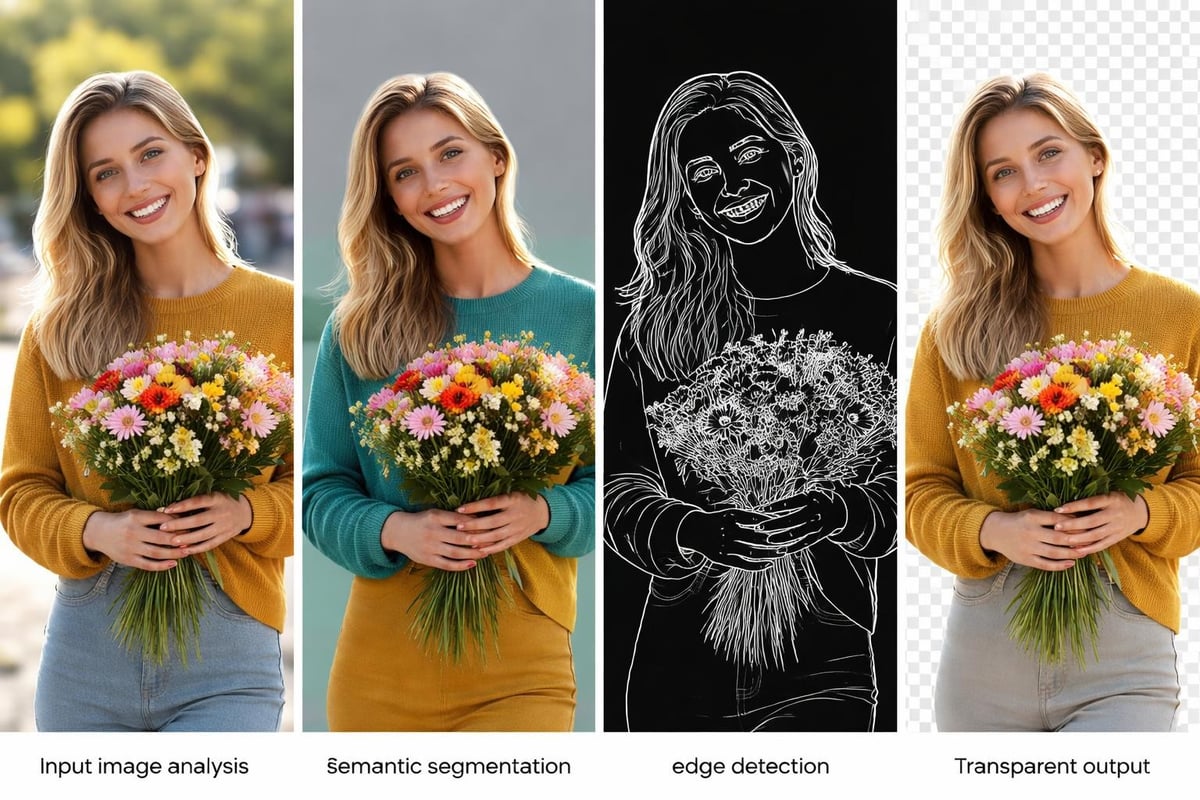
Performance metrics for background removing ai have improved dramatically. Where early systems achieved 85-90% accuracy on simple images, current platforms consistently deliver 95-98% precision even on complex subjects with intricate details. Processing speeds have accelerated from several seconds per image to near-instantaneous results, enabling real-time workflows.
Background removing ai serves diverse industries, each with unique requirements and challenges. E-commerce businesses represent one of the largest user groups, needing consistent product images against white or transparent backgrounds for marketplaces like Amazon, eBay, and Shopify stores.
Marketing teams utilize this technology to create versatile assets quickly. A single product photo can be transformed into multiple variations with different backgrounds, seasonal themes, or promotional contexts. This flexibility reduces photoshoot costs and enables rapid campaign deployment.
Industry | Primary Use Case | Key Advantage |
|---|---|---|
E-commerce | Product catalog standardization | Consistent brand presentation across thousands of SKUs |
Real Estate | Property listing enhancement | Clean, professional photos that highlight spaces |
Automotive | Vehicle showcase imagery | Uniform backgrounds that emphasize vehicle features |
Fashion | Model and clothing isolation | Easy background swapping for seasonal campaigns |
Photography | Portrait refinement | Professional results for clients without studio setups |
Professional photographers and studios have integrated background removing ai into their post-production workflows. The professional services offered by platforms like removit combine automated AI processing with expert retouching to deliver results that meet exacting standards for commercial photography.
Real estate professionals use background removing ai to enhance property photos by removing distracting elements, replacing overcast skies, or creating composite images that showcase properties in their best light. Automotive dealers process vehicle inventory photos to maintain consistent white backgrounds across their entire stock.
Content creators and social media managers leverage this technology for rapid content production. Instagram influencers, YouTube thumbnails, and marketing graphics benefit from quick subject extraction that enables creative compositions without requiring advanced photo editing skills.
When selecting a background removing ai solution, several critical features determine whether the platform meets your business needs. Accuracy remains paramount, but businesses should evaluate accuracy across their specific image types rather than general benchmarks.
Batch processing capabilities separate professional tools from consumer applications. Businesses handling large volumes need systems that process hundreds or thousands of images simultaneously while maintaining quality consistency. The API integration options enable automated workflows where images are processed as they enter your system, eliminating manual intervention entirely.
Edge refinement quality affects the final result's professionalism. Superior background removing ai preserves fine details like:
Individual hair strands on human subjects
Transparent or semi-transparent materials like glass or fabric
Fur textures on animals or textile products
Complex shapes with intricate cutouts
Shadow preservation options for realistic compositing
Format flexibility ensures compatibility with downstream workflows. Professional platforms export transparent PNGs for web use, layered PSDs for further editing, or format-specific optimizations for different channels. The image optimization services from removit handle format conversion automatically based on intended use.
Processing speed impacts operational efficiency differently across business models. E-commerce platforms uploading new products benefit from instant processing, while professional studios might prioritize quality over speed. Modern background removing ai balances both, typically processing standard images in under two seconds.

Privacy and data security considerations matter significantly in 2026. European businesses particularly value GDPR-compliant processing, where images are handled securely without unauthorized data retention. European-focused platforms ensure data sovereignty and regulatory compliance.
Maximizing background removing ai effectiveness requires understanding how to prepare images and configure settings for optimal results. Input image quality directly impacts output quality, even with sophisticated AI systems.
Lighting consistency in original photos produces better extraction results. Well-lit subjects with clear separation from backgrounds require less AI interpretation, resulting in cleaner edges and fewer artifacts. When photographing products specifically for background removal, maintain even lighting that minimizes harsh shadows and highlights.
Pre-processing steps can significantly improve background removing ai results:
Shoot at higher resolutions (minimum 2000px on the longest side) to provide more pixel data for edge detection
Maintain adequate contrast between subject and background
Avoid motion blur or focus issues that create ambiguous edges
Use RAW formats when possible for maximum detail preservation
Position subjects centrally with clear space around all edges
Post-processing refinement handles edge cases where AI extraction needs human judgment. Tools like Fotor's background remover preserve intricate details like hair and fur, but complex scenarios may benefit from manual touch-ups around challenging areas.
Color fringing and halo effects sometimes occur around extracted subjects, particularly when removing colorful backgrounds. Advanced background removing ai platforms offer defringe tools that analyze edge pixels and neutralize color contamination while preserving genuine subject colors.
Modern businesses require background removing ai that integrates seamlessly with existing systems rather than functioning as standalone tools. API-first platforms enable programmatic access where images are processed automatically as part of larger workflows.
E-commerce platforms benefit from direct integrations with content management systems. Products photographed in studios can flow through automated pipelines: upload to cloud storage, background removal processing, format optimization, and publication to multiple sales channels without manual intervention.
Workflow Stage | Manual Process Time | Automated Process Time | Efficiency Gain |
|---|---|---|---|
Image upload and organization | 5 minutes per batch | 30 seconds | 90% reduction |
Background removal | 15-20 minutes per image | 2-3 seconds per image | 99% reduction |
Format conversion and optimization | 3-5 minutes per image | Automatic | 100% automation |
Distribution to channels | 10 minutes per product | Automatic | 100% automation |
The Picture Instruments AI system demonstrates holistic workflow approaches that combine live background removal with batch processing, showcasing how integrated solutions deliver greater value than point solutions.
Quality control mechanisms ensure consistency across large volumes. Automated confidence scoring helps identify images that may need human review, creating exception workflows that maintain quality without requiring manual inspection of every image.
Background removing ai pricing models vary significantly, from free consumer tools to enterprise subscriptions. Understanding total cost of ownership requires examining both direct platform costs and indirect efficiency gains.
Time savings represent the most immediate ROI. Professional retouchers charge $15-50 per image for manual background removal, while AI solutions typically cost $0.10-1.00 per image depending on volume and quality requirements. For businesses processing 1,000 images monthly, this translates to potential savings of $15,000-49,000 annually.
Credit-based systems offer flexibility for variable workloads. Businesses purchase processing credits in advance, consuming them as needed without monthly minimums. This model suits seasonal businesses or those with fluctuating image processing needs. Pricing structures at removit accommodate different business scales and processing volumes.
Determine current costs: Calculate hours spent on manual background removal multiplied by hourly rates
Estimate processing volume: Project monthly or annual image quantities
Compare platform costs: Evaluate per-image rates or subscription fees
Factor quality requirements: Higher precision needs may justify premium services
Include integration value: API automation eliminates manual transfer time between systems
Subscription models work best for consistent, predictable volumes. Enterprise agreements often include dedicated support, priority processing, custom integrations, and volume discounts. Many platforms offer referral programs that reduce processing costs further as businesses recommend services to partners.

Hidden costs in background removing ai include learning curves, integration development, and occasional manual corrections. However, these typically represent less than 10% of the savings from automation, making ROI positive even in conservative calculations.
No background removing ai achieves perfect accuracy on every image. Understanding common failure modes and implementing appropriate quality controls ensures consistent output quality that meets brand standards.
Complex transparency scenarios challenge most AI systems. Products with glass, smoke, or translucent materials require sophisticated algorithms that distinguish between genuinely transparent areas and background regions. Advanced platforms handle these scenarios better, but edge cases may still need manual review.
Shadow handling represents another quality consideration. Some applications require clean cutouts with all shadows removed, while others benefit from preserved drop shadows for realistic compositing. Configurable shadow settings let users specify desired behavior rather than accepting one-size-fits-all processing.
Hair and fur imperfections: Use tools with specialized algorithms for fine detail preservation
Color contamination: Apply defringe settings to neutralize background color bleeding
Incomplete removal: Adjust sensitivity settings or use manual refinement tools
Loss of subject detail: Verify input image quality and resolution meet minimum requirements
Inconsistent batch results: Ensure lighting and shooting conditions remain constant across images
Platforms like Pixelcut's AI background remover offer batch processing features alongside manual refinement tools, enabling efficient processing with quality safeguards. Users can review automated results and make targeted adjustments where needed.
Quality metrics help track background removing ai performance over time. Monitoring average confidence scores, manual correction rates, and customer acceptance percentages identifies whether your current solution meets evolving needs or if adjustments are necessary.
The background removing ai landscape continues evolving rapidly, with several emerging capabilities poised to transform workflows further in coming years. Video background removal has progressed from experimental to practical, enabling real-time subject isolation in moving footage for virtual production and content creation.
Multi-object intelligence allows AI to understand scene composition and remove or isolate specific elements rather than simply separating foreground from background. This enables more nuanced editing like removing distracting objects while preserving the primary subject and its natural environment.
Context-aware replacement goes beyond simple removal to intelligently fill removed areas with appropriate content. Rather than leaving transparency or solid colors, advanced systems reconstruct plausible backgrounds based on surrounding pixels and semantic understanding of the scene.
Industry-specific training improves accuracy for specialized applications. Medical imaging, scientific photography, and technical documentation have unique requirements that general-purpose background removing ai may not address optimally. Specialized models trained on domain-specific datasets deliver superior results for these niche applications.
Integration with 3D modeling and augmented reality creates new possibilities for product visualization. Extracted subjects can be automatically converted to 3D models or placed in AR environments, enabling interactive shopping experiences and virtual try-on applications.
The democratization of professional-quality results continues as background removing ai becomes more accessible. Tools like BGone and BG Blaster provide free or low-cost options with capabilities that rival expensive professional software from just a few years ago, making high-quality image processing available to businesses of all sizes.
Background removing ai has transformed from a novel technology to an essential business tool, delivering unprecedented efficiency and quality in image processing workflows. The combination of advanced neural networks, batch processing capabilities, and seamless integrations enables businesses to handle visual content at scales previously impossible without large teams. Whether you're processing product catalogs, marketing materials, or professional photography, implementing the right background removal solution drives measurable ROI through time savings and quality improvements. Removit provides European businesses with GDPR-compliant, AI-powered image optimization that automates your entire photo workflow while maintaining the professional quality your brand demands.
